
Experiences · with Noah's PRO

Motion that feels designed, not coded.
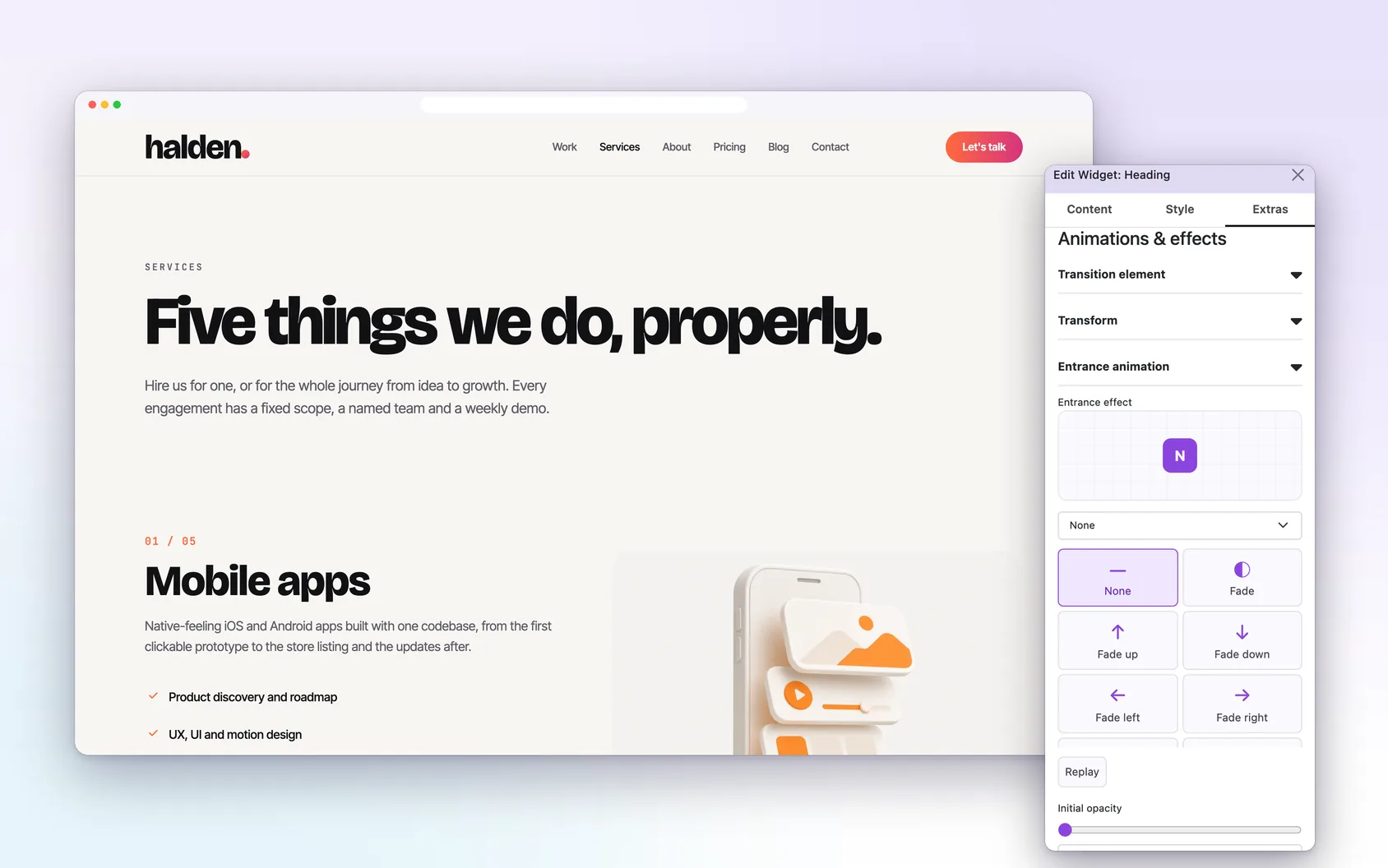
Entrance animations, scroll-linked effects, floating elements and hero scenes, as controls on every widget, column and section. Keep scrolling: this page is the demo.
enter: fade-up
scroll: custom
float: on
hero: shrink
cascade: zoom-in
Noah's Animations and effects panel with entrance presets, next to a live page
Under the hood

Every effect on this page is a control you click.

8
Entrance effects
8
Scroll presets + custom
5
Properties to animate
0
Lines of code
01 · Enter

Make an entrance.

Eight entrance effects for any widget, column or section. Set the duration, delay and easing, and play them once or every time they come into view. Scroll up and down: these play again.
fade-up
800 ms · ease-out · repeat
fade-down
800 ms · ease-out · repeat
fade-left
900 ms · ease-out · repeat
fade-right
900 ms · ease-out · repeat
zoom-in
900 ms · ease-out · repeat
zoom-out
900 ms · ease-out · repeat
flip-up
1000 ms · ease-out · repeat
fade
1000 ms · ease-out · repeat
Cascade
One control on the column. Its children follow, one after another.
Builder
Popups
AI
Experiences
Translations
Mail
PRO
02 · Scroll

Tied to your scroll. Frame by frame.

Move, scale, rotate and fade anything as the page goes by. With smoothing at 0 the browser drives the effect: it follows your scroll exactly, forwards and backwards.
Choose where the effect starts and ends
Animate X, Y, scale, rotation and opacity
Turn it off on mobile with one select

Noah's editor with the animations and effects options open
Slide in

A custom scroll effect: every value is set in the panel, and the card follows your scroll in both directions.

x: −160 → 0 · rotate: −8° → 0°
Grow in

A custom scroll effect: every value is set in the panel, and the card follows your scroll in both directions.

y: 140 → 0 · scale: 0.8 → 1
Swing in

A custom scroll effect: every value is set in the panel, and the card follows your scroll in both directions.

y: 160 → 0 · rotate: 8° → 0°
03 · Parallax

Same preset. Three intensities.

One scroll preset, depth, with a different intensity on each image. Watch how far each one travels.
Halden, a product studio, built with Noah's: home page
scroll: depth · intensity 40
Halden, a product studio, built with Noah's: work page
scroll: depth · intensity 100
Halden, a product studio, built with Noah's: services page
scroll: depth · intensity 180

Or start from a preset.

Rise

Climbs into place as it enters the screen.

scroll: rise
Drift

Slides sideways while you scroll.

scroll: drift
Grow

Scales up with the scroll. Great for images.

scroll: zoom
Rotate in

Turns upright as it reaches its place.

scroll: rotate-in
04 · Float

Things that breathe.

A gentle, endless float for images, badges and icons. Set the distance and the speed, and give each element its own rhythm.
float · 8px · 6s
float · 11px · 8s
float · 14px · 10s
Halden, a product studio, built with Noah's: home page on a phone
Arclight, an AI agency, built with Noah's: home page on a phone
05 · Conditions · free

The right message for each visitor.

Display conditions come with the free editor. Show or hide any widget depending on a URL parameter or a cookie: same page, a different message.
URL parameter

Campaign links such as ?utm_source=newsletter.

Cookie

Show it only when a cookie is set, or hide it after the first visit.

Example
yoursite.com/offer?utm_source=newsletter
Welcome back, newsletter reader.

Give this widget the condition utm_source = newsletter and only visitors who arrive from your newsletter link see it. Everyone else gets the page as usual.

06 · Hero scenes

Scroll and watch this take over.

Turn a section into a short story: a column grows to full width, or the whole row shrinks into a card, like the top of this page. One control on the row.
Noah's Page Builder editor: the widget panel next to a live page being designed
Ready when you are

Your pages, in motion.

Motion effects come with Noah's PRO, from 25 € for 3 months. The editor itself is free and open source.
FAQ

Motion, explained.

Still curious? Our support team answers every message.

No. Every effect is a control in the panel of the widget, column or section. Pick it, tune it and check it in the live preview.

Entrance, scroll, float, cascade and hero scene effects come with Noah's PRO. Display conditions (URL parameter and cookie) are part of the free editor.

Yes. Each effect has a Devices option: all devices, desktop only, or desktop and tablet.

Your choice: once, or every time the element comes into view. Scroll effects follow the scroll in both directions.

It softens how the element follows the scroll. With smoothing at 0 the browser drives the effect, so it follows your scroll exactly, forwards and backwards.

A short scroll story on one row: a column grows to full width, or the whole row shrinks into a card, like the top of this page. It is a single control on the row.

Showing or hiding a widget depending on a URL parameter or a cookie. For example, a message only for visitors who arrive with utm_source=newsletter.